


Hi Friends,
Welcome to the 176th issue of the Polymathic Engineer newsletter.
This week, we continue our series of articles on service mesh. In the previous article, we discussed what a service mesh is and how it works. We’ve seen that a service mesh is a separate layer of infrastructure that handles all the traffic between services. The key idea is the sidecar pattern, where a small proxy runs next to each service instance and quietly takes over the networking job.
Now that we understand what a service mesh is, the natural next question is what you really get out of it. The short answer is that it gives you 4 things: traffic management, reliability, security, and observability. All microservice systems have to deal with these issues, and a service mesh solves them all in one place.
Another benefit that runs through all of these is polyglot support. As we have seen in the previous article, the library approach breaks down when teams use more than one programming language. A service mesh avoids this issue because it does everything in the proxy layer. Regardless of whether a service is written in Go, Python, Java, or C#, it gets the same retries, the same mTLS, the same metrics, and the same routing rules. There is no library for each language to build and maintain.
However, not all is for free. A service mesh has a cost in terms of latency, complexity, and resources. First, we will talk about the beneficial things, then about the trade-offs, and finally, we’ll take a quick look at the most typical service mesh implementations.
The outline is as follows:
Traffic management and routing
Reliability
Security
Observability
Trade-offs: when a mesh isn’t worth it
A quick tour of popular meshes
Project-based learning is the best way to develop technical skills. CodeCrafters is an excellent platform for tackling exciting projects, such as building your own Redis, Kafka, a DNS server, SQLite, an HTTP server, or Git from scratch using your favorite programming language. Now you can also try to build your own Claude Code (for free, still in beta).
Sign up, and become a better software engineer.
Traffic management and routing
The first thing a service mesh gives you is control over how traffic flows between your services.
When a service wants to call another service, it needs to know its address. In the past, when data centers were on-premises, these addresses were usually hardcoded because machines rarely changed. This isn't true anymore in the cloud. Instances come and go, IP addresses change, and services often move to different nodes. Your code will break whenever the network layout shifts if you hardcode addresses.
A service mesh takes care of this for you through service discovery. The sidecar keeps track of where each service lives in real time. The proxy finds out the service that the application is calling by name and directs the request there. The application doesn’t need to know any IP addresses, and it doesn’t need to be redeployed when something moves.
On top of this, the mesh can normalize service names across environments. The code might, for example, call a service called sessions-service. Then, when the code is put into production, it talks to a production instance. When it is put into staging, it talks to a staging instance. The mesh knows which one to use based on where it is running, so the application doesn’t have to carry environment-specific configuration.
Another key feature is load balancing. When there are multiple instances of a service, the mesh spreads the traffic across them. Because the sidecar understands application-level protocols like HTTP/2 and gRPC, it can do request-level load balancing, not just connection-level. This is important since one gRPC connection can handle numerous requests. If there is no request-level balancing, one connection would pin all the work to a single instance.
Beyond simple balancing, a service mesh supports more advanced traffic control. We can split traffic between two versions of a service: for example, send 95% of the calls to v1 and 5% to v2 to roll out a new release gradually. This is how canary deployments work at the infrastructure layer, without having to touch the application. We can also mirror traffic, sending a copy of the requests to a test instance to see how it handles production load, without affecting the real responses.
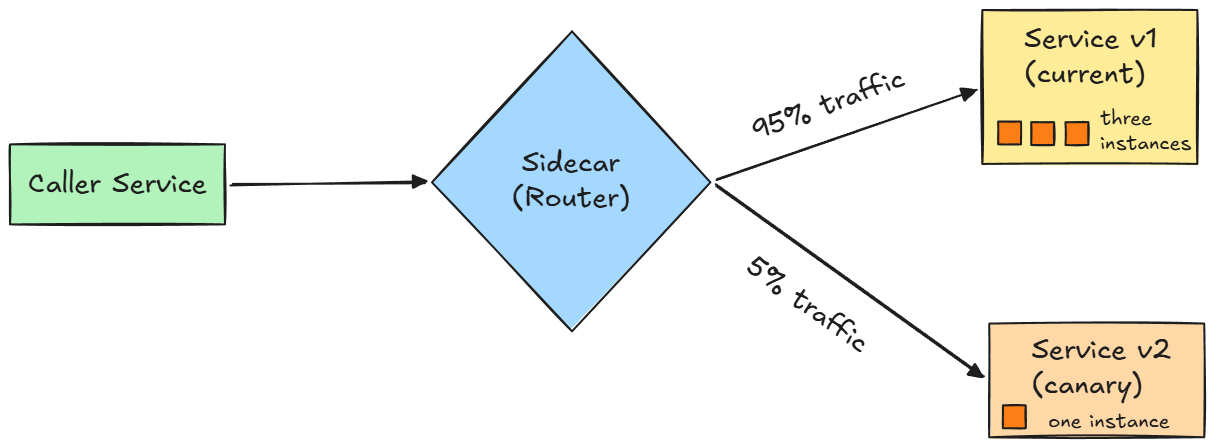
Traffic shaping and traffic policing are other useful tools. Shaping is when you slow down some traffic to make it fit a certain pattern. For example, you might give paying customers priority over free-tier users. Policing is making sure a contract is followed. For example, you could block a service that makes too many requests to a downstream dependency. Both are ways to keep the system stable when some parts behave badly.
You can set all of this without changing the application code. The mesh configuration is stored in files that the platform or infrastructure teams can update, and the sidecars pick up the changes.
Reliability
Networks fail. Services can become slow or unresponsive. Instances can crash or get too loaded during traffic spikes. In microservice systems, any call between services is a potential point of failure. If you don’t manage these failures in a consistent way, the issues spread through the system very quickly.
A service mesh can apply the well-known reliability patterns to every call, without the applications having to know about them.
The first one is retries. If a call fails because of a temporary error, the sidecar retries it automatically, usually with exponential backoff. This means that the proxy waits a bit longer between each attempt to avoid making things worse when a service is already having trouble. The mesh can also distinguish between errors that are worth retrying, like a network timeout, and errors that are not, like a 404 response.
Timeouts work in the same way. The sidecar gives up instead of waiting forever when a call takes too long. This is important because slow calls can add up quickly.If there is no timeout, a slow downstream service can use up all the system’s resources while every call upstream waits for a response that never comes.