


Hi Friends,
Welcome to the 201th issue of the Polymathic Engineer newsletter.
Let’s be honest: every software engineer has been assigned a bug that looked like half an hour of work and ended up taking a whole day.
Most of the time, this happens because we don’t know the root cause of the bug, so we resort to trial and error. We try to add a null check here or insert a delay before a page loads, hoping the problem will vanish. Brian Kernighan and P. J. Plauger once wrote that “everyone knows that debugging is twice as hard as writing a program in the first place.” Guessing makes the task even more daunting.
In this issue, we will go through a process for finding and fixing bugs that doesn’t rely on guessing. Software is a series of steps executed in order, and a bug simply means that one of those steps is broken. Debugging is finding that step. Everything you do should narrow the search or prevent you from repeating it.
The outline is as follows:
Reproduce the bug first
Ask who is affected and what changed
Find the broken step
When the search stalls
Fix the cause, not the symptom
Confirm that the fix worked
To learn technical skills, you must work on real projects. CodeCrafters is a great platform for that. You can build your own Redis, Kafka, DNS server, SQLite, HTTP server, or Git from scratch using your chosen programming language.
Reproduce the bug first
The first thing is to reproduce the bug. It sounds simple, yet many engineers try the reported steps once, see that everything apparently works, and close the bug with a “can’t reproduce” comment. Before you can make such a claim, there is a whole list of things you should try:
The version of the app or the backend must be identical to the one in the bug report.
The device and its operating system matter because there might be millions of combinations of hardware and OS.
The network you test on is usually fast and has no contention, while real users might be on a slow mobile connection.
The language and the other user settings can change what the code does.
The feature flags the user is in are often the difference. Most companies run numerous experiments simultaneously using these flags; therefore, check which ones are enabled for the user who reported the issue.
The number of attempts should be more than one. Some bugs are not fully deterministic, so try 5 or 10 times.
Often, you get stuck on bugs that depend on the path taken. For a mobile app, a report might state that moving from screen A to screen B doesn’t work, yet when you try to replicate it, everything goes smoothly. The bug only occurs based on what the user did before reaching A, and the user didn’t realize it. You have to consider what the report doesn’t capture.
If you still can’t reproduce the bug, get the logs of that specific user on both the client and the server, together with the history of the versions they were on. Furthermore, do not rely too heavily on the category specified in the report: an issue classified as a functional bug might, in reality, turn out to be a concurrency or performance problem.
While you do all this, write down what you tried, including the attempts that failed. Failed attempts are as valuable as successful ones since other people can tell you what to try differently.
Suppose that users report that after changing their profile picture, the app keeps showing the old one. When you change the picture on your own account, the new one appears immediately. Before closing the bug, set up a test account that mirrors one of the affected accounts, with the same app version and flags. This time, the old picture stays. You don’t know yet which difference matters, but you are now able to reproduce the bug whenever you want.
Ask who is affected and what changed
Once you are able to reproduce the bug, two questions narrow down the scope of your investigation even before you read a single line of code: who is affected, and what has changed.
To answer the first, write down when the problem started and whether it is getting worse or staying the same. Then check whether it is limited to users in a particular location, to a subset of users such as those in a specific experiment, or to certain versions of the app. By grouping reports according to each of these dimensions, you may be able to distinguish the users affected by the problem from all others.
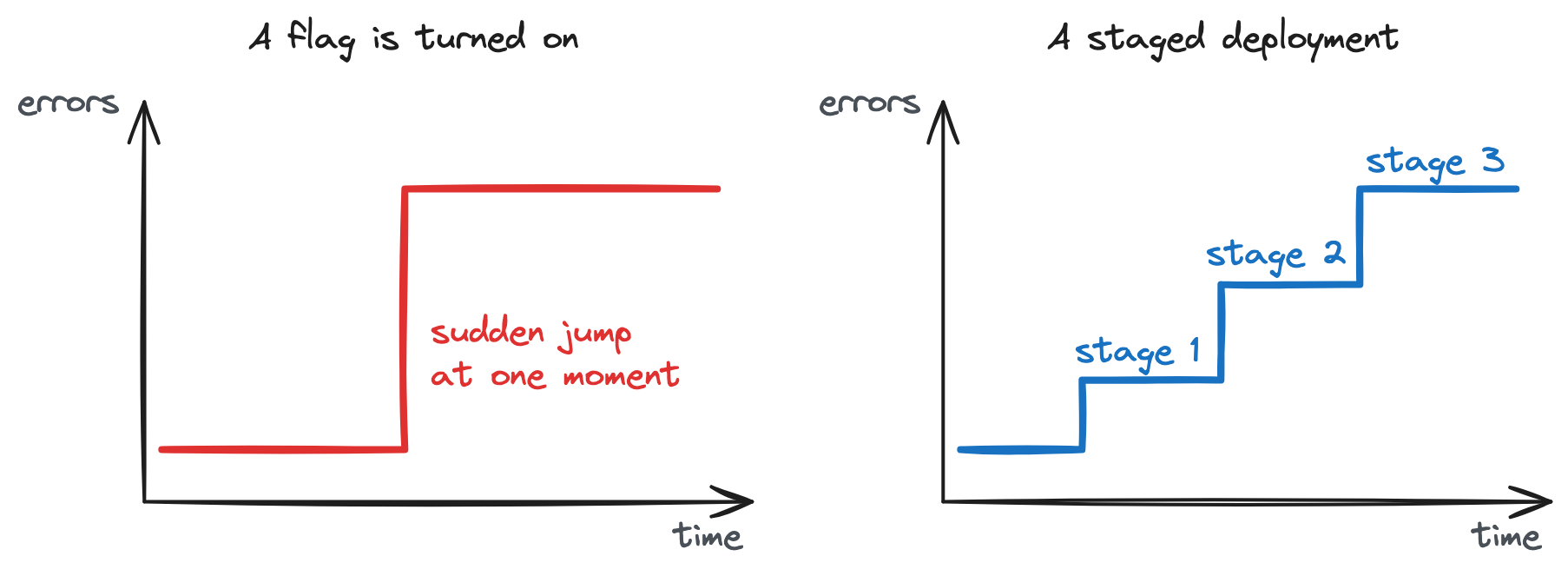
The second question matters because a bug often doesn’t come from an initial version of the code that was wrong. Something about the environment changed, and an assumption that was true when the code was written is no longer true. In practice, a change reaches users in one of two ways: through the deployment of a new version of the code or by enabling a flag. A deployment is usually rolled out in stages, first to a small percentage of the users and then to everybody. A flag, in contrast, takes effect immediately for all the users it targets.
This difference gives you a hint. If there is a sudden spike in errors at a specific time, a staged deployment is unlikely to be the cause, since its effect would grow one stage at a time. It is more likely that a flag was turned on, so look for flags enabled within a few minutes of the jump. The hint only holds where deployments are staged, and flags apply at once. A flag ramped up by percentage shows a jump at each increase.
Timing also allows you to rule out suspects. If somebody claims that a recent change of yours broke something, check whether that change has reached production at all. If it hasn’t, it can’t be the cause.
In our example, reports come from every region and every version of the app; however, all affected accounts belong to a group tied to a single feature flag being rolled out gradually. A stale picture doesn’t raise any error, so the metric to consider is the hourly volume of user reports, which spiked precisely when the flag’s coverage increased from 5% to 20% of the user base.
If the issue is severe, the goal at this point is to stem the bleeding rather than to understand the bug. Identify the change that most likely caused the issue and undo it, if it is safe to do so. The proper fix can come afterward. Turning a flag off is the cheapest way to do this. In our example, you would turn the flag off for the users and keep it on for the test account, so that the search can continue.