


Hi Friends,
Welcome to the 185th issue of the Polymathic Engineer newsletter. This week we conclude our series of articles on the Internet Protocol and addressing.
In Part I, we stayed inside a single network and learned how an address and a mask work together. In Part II, we extended our discussion to the whole Internet and saw how CIDR, NAT, and DHCP kept IPv4 alive. In both parts, we have considered the packet itself as a black box: something with a source address and a destination address that somehow finds its way.
This week, we open the box. A packet is an specific string of bits, and each bit is there for a reason. We will look at the IPv4 header field by field, and discuss what happens when a packet is too big for the phyisical link it has to go through. We will also find out why both TCP and IP have a checksum, which is something that a lot of engineers do not understand. At the end, we will look at how IPv6 redesigned the whole thing. This is the best way to get a sense of which parts of IPv4 were good ideas and which parts were not.
The outline is as follows:
The IPv4 datagram format
Fragmentation and MTU
Why a checksum at two layers?
IPv6: what they fixed
To learn technical skills you must work on real projects. CodeCrafters is a great platform for that. You can build your own Redis, Kafka, DNS server, SQLite, HTTP server, or Git from scratch using your chosen programming language.
The IPv4 Datagram Format
At the network layer, a packet is called a datagram. An IPv4 datagram has two parts: a header, which is usually 20 bytes, and a payload, which carries the actual data. We are interested in the header because it is the protocol. Every rule we have talked about so far in this series can be found in one of these fields.
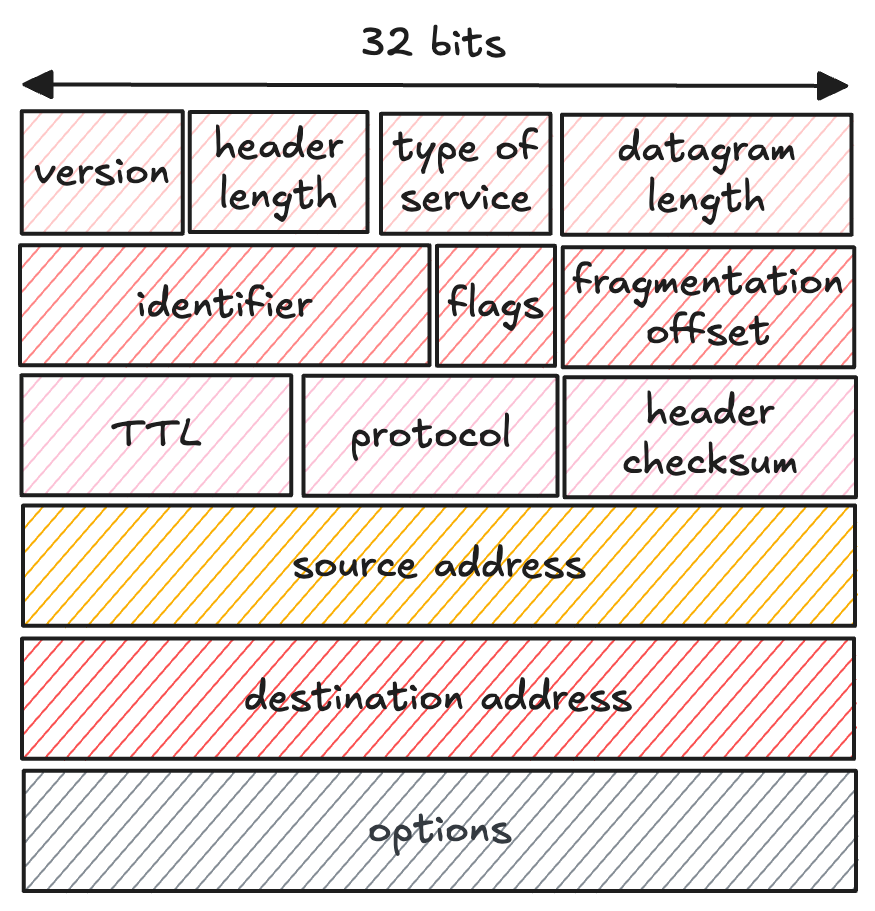
Let’s go through the most important fields of the IP header:
Version. The first 4 bits say which version of IP the datagram uses. A router reads this field first, because it determines how to interpret everything that follows. For IPv4, the value is 4.
Header length. The header can contain optional fields, so its size is not fixed. These 4 bits tell the receiver where the header ends and the payload begins. The typical value corresponds to 20 bytes.
Datagram length. The total size of the datagram, header plus payload, in bytes. The field is 16 bits, so a datagram can in theory be 65,535 bytes long. In practice, datagrams are rarely bigger than 1,500 bytes, for a reason we will see in the next section.
Identifier, flags, fragmentation offset. These three fields have been introduced to handle fragmentation, when a packet must be split into smaller pieces along the way. They deserve their own section, and they will get one shortly.
Time-to-live (TTL). A counter that prevents a datagram from remaining on the network forever, for example when routers end up in a routing loop. Every router that processes the datagram decreases the TTL by one, and when it reaches 0, the datagram is dropped.
Protocol. This field is a code that indicates which transport protocol the payload belongs to: 6 means TCP, 17 means UDP. It is only used at the final destination, to hand the payload to the right protocol. It plays the same role between the network and transport layers that the port number plays between the transport layer and applications.
Header checksum. A small value that lets a router detect bit errors in the header. Routers typically drop a datagram whose checksum doesn’t match. Notice that since the TTL changes at every hop, the checksum must be recalculated at every hop too.
Source and destination addresses. The two fields we spent Parts I and II on. The source inserts its own address in the first and the address of the final destination, usually obtained through a DNS lookup, in the second.
Options. Rarely used extensions to the header. They sound harmless, but they make the header variable in length, so a router can’t know in advance where the payload starts, and processing time becomes unpredictable. Keep them in mind, because IPv6 makes a pointed decision about them.
Payload. The data itself, which is normally a TCP or UDP segment, but can carry other things as well, such as ICMP error messages.
One number worth remembering: with a 20-byte IP header and a 20-byte TCP header, every packet you send carries 40 bytes of headers before a single byte of your data.
Fragmentation and MTU
Not every link-layer technology can transport packets of the same size. The maximum transmission unit (MTU) is the largest amount of data that a frame can hold. Ethernet, the most common technology, can carry 1,500 bytes, while some older wide-area links stop at 576. Since every datagram has to travel inside a link-layer frame, the MTU is a hard upper bound on the size of the datagram. In the previous section we mentioned that datagrams are rarely larger than 1,500 bytes exactly because that is how much an Ethernet frame can carry.
The problem is that a packet may traverse many links, each with a possibly different MTU. Let’s imagine a router has to forward a 4,000-byte datagram on a link with an MTU of 1,500 bytes. The datagram simply doesn’t fit. The solution is to break the payload into pieces, then send each piece as a smaller datagram. Each of these bits is termed a fragment.
The fragments must be put back together before the data reaches the transport layer, since TCP and UDP want to receive complete segments. The designers of IPv4 had to decide where that reassembly should take place, and they chose the end host, not the routers. Reassembling fragments in the middle of the network would force routers to hold state and wait for pieces, slowing everything down. The principle of allowing the destination to do the work, and keeping the network core simple, appears throughout the whole design of the Internet.
This is where the identifier, flags, and offset fields from the previous section are used. Every datagram gets an identifier from its sender, and when a router fragments it, all the fragments keep the identifier of the original. The destination uses it to recognize which fragments belong together. The offset tells us where each fragment’s data is in the original payload so we can put the parts back together and spot any gaps. The flag bit distinguishes the last fragment, which carries 0, from all the others, which carry 1; without it, the destination could never be sure the sequence was complete.
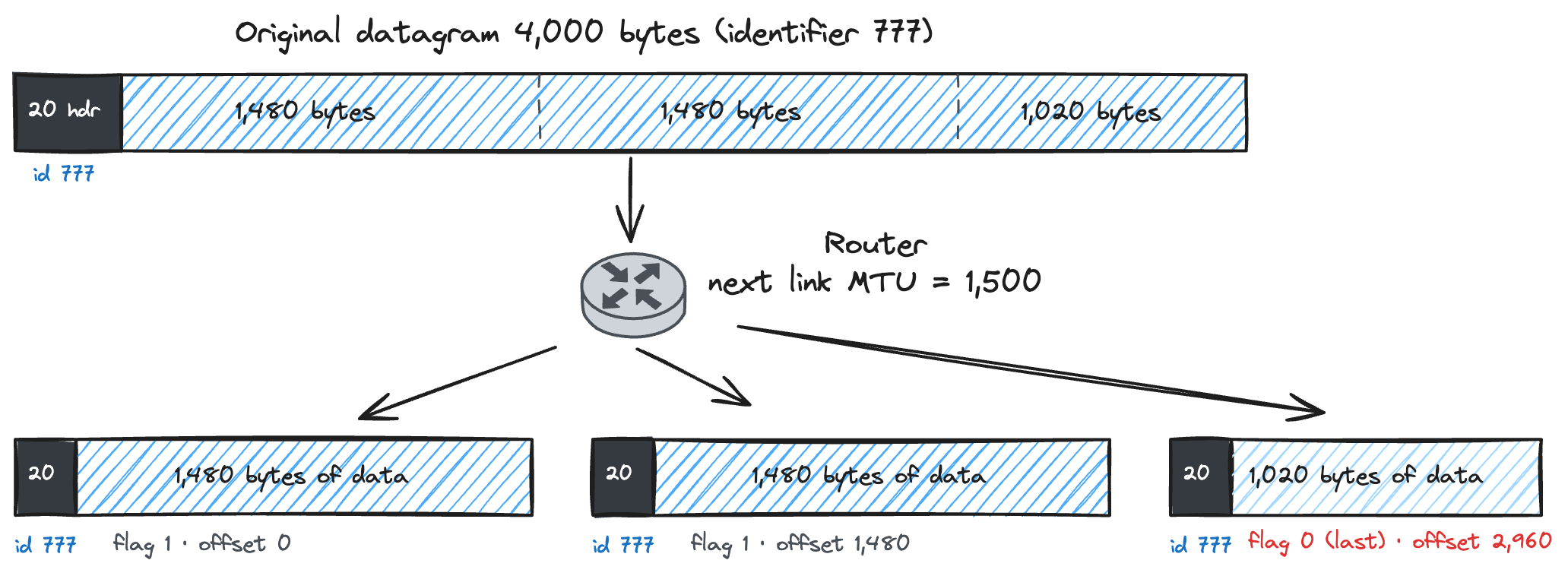
Let’s take a numerical example. Suppose we have a 4,000-byte datagram with 20 bytes of header and 3,980 bytes of data. It must be transmitted over a link with an MTU of 1,500 bytes. Each fragment can carry up to 1,480 bytes of data, because its own 20-byte header takes up the rest. The router then breaks the datagram into three fragments: two fragments of 1480 bytes each and a third fragment comprising the remaining 1020 bytes.
Each fragment becomes a complete IP datagram, with its own header, and travels over the link independently. If one of them gets lost, the destination cannot reconstruct the original datagram. This fragility is one of the reasons why most people don’t consider fragmentation as a feature, and is one of the things IPv6 got rid of, as we will see.
Why a Checksum at Two Layers?
The header checksum raises a question that comes up often in networking interviews: since TCP already has a checksum, why does IP compute a checksum too? Isn’t that wasted work?
The first part of the answer is that the two checksums don’t cover the same bits. The IP checksum protects only the IP header, the 20 bytes we already discussed. The TCP or UDP checksum instead covers the whole segment, including the header and the data. The network layer only checks the information it needs to do its own job, such as the destination address and the TTL, and lets the layer above it ensure the data is correct. A router doesn’t care whether your payload is intact; it cares only about not sending a packet whose destination address got corrupted.
The second part of the answer is that layers needs to be kept separated from each other. TCP and IP are used together most of the time, but nothing requires it. In principle, TCP can run on top of a different network protocol, and IP can carry payloads that are not TCP or UDP at all, such as the ICMP messages we mentioned earlier. Each level must be able to protect its own data without guessing anything about the layers around it.
There is also a practical reason why the IP checksum stays small. The TTL goes down at every hop, so the checksum needs to be calculated again. While checking 20 bytes at every router is cheap, checking the whole packet at every router would not be so. This way, the routers check only the modifications on the way while the end hosts check the full data once.
IPv6: What They Fixed
IPv6 is a new format that was designed since there were not enough IP addresses on the internet. The main change is the address size. An IPv6 address is 128 bits instead of 32, which takes us from 4.29 billion addresses to a number with 38 digits. Address exhaustion, the problem that gave us NAT and private addresses, simply stops existing.
However, the interesting part for this article is not what IPv6 added. It is what IPv6 removed. The designers had 20 years of experience studying IPv4 in the wild, and the new header is a field-by-field verdict on the old.
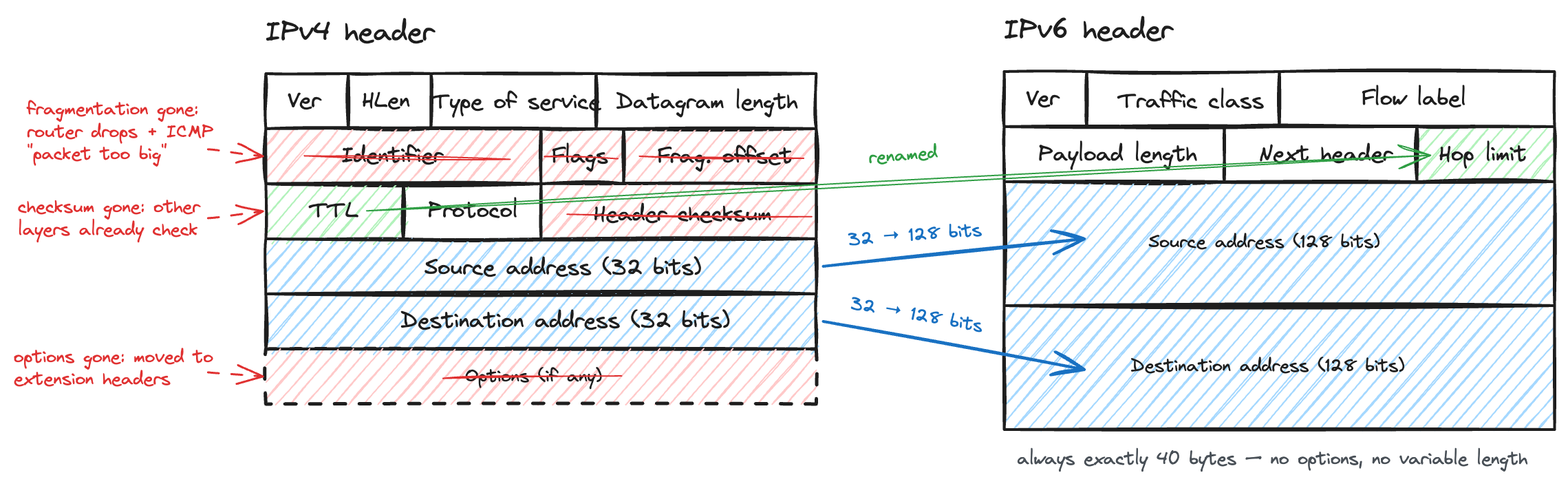
No more fragmentation. When receiving a datagram too large to be forwarded over the next link, an IPv6 router does not fragment it, but drops it and returns an ICMP “packet too big” message. The sender then retries with smaller datagrams. All of that machinery we saw before, the identifier, the flags, the offset, the fragile reassembly at the destination, goes away, and routers get faster because they never have to fragment anything.
The header checksum is also gone. There was no need to calculate a checksum at each hop just for the TTL since the link layer finds errors on its own and the transport layer checks its data.
The options are no longer there either. An IPv6 header is always 40 bytes long, and any additional information is placed in separate extension headers that follow. A router always knows where the payload begins, and processing time is predictable, precisely what IPv4 headers that can have different lengths could not offer. Broadcast, as we saw in Part I, is gone as well. Multicast and a new type called anycast have taken its place.
With that, we have reached the end of our tour through IP. In Part I, we learned how an address and a mask tell a device what is local and what is not. In Part II, we talked about how the Internet stretched 4.29 billion addresses across a world that needed far more. And in this part, we opened the packet itself and found that every field earns its place, because the ones that didn’t are exactly the ones IPv6 threw away.