


Hi Friends,
Welcome to the 181st issue of the Polymathic Engineer newsletter.
Take a moment and think about what your computer is doing right now. You have a browser open with a dozen tabs, a music player running in the background, a chat app, and the editor you are typing in. Everything is going on together, without any hitch. We take it for granted, but it is a remarkable thing.
Most of the time, all this is happening on a machine that can really only physically run a handful of things at a time, and just one thing at a time on a single core. So how can the computer keep these jobs going at once? And what is going on underneath when it seems as if everything is running in parallel?
In a recent article, we broke down concurrent programs into processes and threads, and started calling them tasks. Now we look at the layer that brings those tasks to life. The operating system takes many tasks that all want the CPU and juggles them so fast that it feels like everything is running at once. This trick is called multitasking, and it is the reason a single core can feel like many.
The outline is as follows:
CPU-bound and I/O-bound tasks
Why one core isn’t enough
Preemptive multitasking
Context switching
The scheduler
Multitasking beyond the operating system
Project-based learning is the best way to develop technical skills. CodeCrafters is an excellent platform for tackling exciting projects, such as building your own Redis, Kafka, a DNS server, SQLite, an HTTP server, or Git from scratch using your favorite programming language. Now you can also try to build your own Claude Code (for free, still in beta).
Sign up and become a better software engineer.
CPU-bound and I/O-bound tasks
Before we get to how the operating system juggles tasks, we need to look at what kind of work those tasks actually do. Not all work is the same, and the difference matters a lot for how the OS treats it.
Every application does two broad kinds of work. The first is computation: arithmetic, logic, comparisons, all the number crunching the CPU is built to. The second is input and output (I/O): reading from the keyboard, the disk, or the network, drawing on the screen, writing files, or sending data over a connection. I/O is really just the process of sending and receiving signals to devices. And most of the time, it does not involve the CPU at all. There is nothing to compute. We are just waiting for the device to answer.
This provides us with a simple way to classify tasks. We say a task is bound by some resource when that resource is the bottleneck: the thing that, if it were faster, would make the whole task faster. There are two main kinds.
A task is CPU-bound if it would run faster with a faster CPU. It spends most of its time computing. Some typical examples are:
Math like additions, divisions, and matrix multiplication
Encryption and decryption, which lean on heavy operations like prime factorization
Image and video processing
Running algorithms like sorting and binary search
A task is I/O-bound if it would run faster with a quicker I/O subsystem, whether that means reading from disk, getting user input, or waiting on a network response. Here the CPU often does nothing but wait for data to move to or from some device, and the CPU time is expensive. Some typical examples are:
Most apps with a graphical interface, even if they never touch the disk, since they spend their time waiting on the keyboard or the mouse
Databases and web servers, which spend most of their time on disk or network I/O
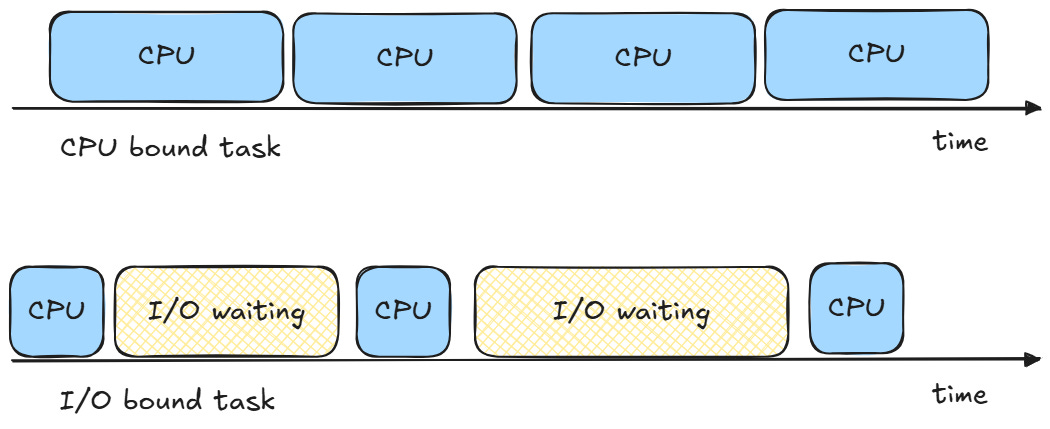
Why this distinction matters? Because it tells us what resource to improve. Take two programs. The first multiplies two huge matrices and returns the answer. The second copies a huge amount of data from the network onto a disk. These two will not speed up in the same way. What good is a faster clock, or a thousand cores instead of one, if the computer spends most of its time waiting for the next batch of data to reach the disk? An I/O bound load will not get better with more cores. However a CPU bound load can really benefit from being spread out across many cores at once.
There is one more thing to know. Over the years, applications have become more and more I/O-bound. The CPU speed kept increasing, and let us run more instructions in the same amount of time, but the data transfer speed never caught up. So the limiting factor in a program is frequently some I/O operation that blocks the CPU. The good news is that these blocking tasks can be detected and forced to run in the background, and that is precisely what modern runtime systems do. That background juggling is where multitasking begins.
Why one core isn’t enough
Let’s make this more concrete. Suppose one of your friends pulls an old portable game console out of a drawer. The device has one slow core, a little pixelated screen, and a few buttons. Your friend knows you write code, so she asks you to build a simple maze game for it, where a hero runs around collecting coins while monsters chase it.
Think about all the things the game has to do. It has to read the buttons so the player can move the hero. At the same time, the world keeps changing on its own, with the monsters moving and the coins being tracked. And the player has to see all of this on the screen as it happens.
So you split the work into three jobs:
Reading the player’s input from the buttons. This is I/O-bound, since most of the time it just waits for a press.
Computing the next state of the world from the game rules and the player’s moves. This is CPU-bound.
Drawing the updated world on the screen. This is I/O-bound again.
The problem is that all three jobs need to make progress together, or the game feels broken. If the console stops reading input while it redraws the screen, the controls freeze. But you have a single core, and it can only ever run one job at a time.
Your first instinct might be to pick up threads. You spawn a single process with three threads, one for each of the jobs, and let them share the game state. It is a reasonable idea. However, if you run it, then the software hangs in the first thread. Reading input is an unending cycle of its own, waiting for a button, never letting the other two run. The single core has room for one thread, and that thread is hogging it.
The lesson is that threads alone don’t buy you anything here. Running things truly at the same instant, which is what we call parallelism, needs hardware with more than one core. On a single core, no amount of threads will make two jobs run at the same moment.
So how do we get out of this? The way out comes from separating two ideas that are easy to mix up: concurrency and parallelism. Parallelism is when things literally run at the same instant on different cores. Concurrency is less powerful but more general. It means that numerous jobs have overlapping lifetimes: they are all in progress over the same span of time, even though at any given instant only one of them is running.
This distinction is the whole point. On one core, we can’t run the three gaming jobs in parallel. But we can run them concurrently, switching between them fast enough that they all make progress. To the player, it looks like everything is moving together. That act of switching is multitasking, and it is how a single core fakes doing multiple things at once.
There is a nice way to think about the relationship between the two. Parallelism is an implementation detail of how the work physically runs. Concurrency is part of how we design the program in the first place. With the right hardware, the OS can turn our concurrent design into real parallelism. Without it, the OS still honors the design by interleaving the jobs on one core. Either way, from our point of view as programmers, the jobs run concurrently.