


Hi Friends,
Welcome to the 158th issue of the Polymathic Engineer newsletter. This week, we are starting a series of in-depth articles on two topics that every developer deals with, but few really understand: authentication and authorization.
Authentication asks “Who are you?” while authorization asks “What are you allowed to do?” The first checks identities, while the latter defines permissions.
Even if you are familiar with login forms, password validation, and user sessions, do you actually know what’s going on behind the scenes? Do you know when to utilize tokens instead of passwords, or why OAuth2 is now the norm in the industry?
The stakes are really high. An authentication system that doesn’t work properly can expose private user data, let unauthorized people in, and damage your application’s reputation.
In this series, we will look at many different ways to authenticate, from old-fashioned passwords to new solutions that don’t use passwords. We’ll look at the pros and cons of each, as well as how they can be used in practice. By the end, you will know how to pick the best method for your needs.
Here’s what we’ll cover in this first article:
Password-based authentication
HTTP Basic Access Authentication
Session-cookie authentication
Token-based authentication
API Keys: A Simple Token Approach
One-Time Passwords (OTP)
Time-Based One-Time Password (TOTP)
Federated identity and Single Sign-On (SSO)
Project-based learning is the best way to develop technical skills. CodeCrafters is an excellent platform for tackling exciting projects, such as building your own Redis, Kafka, a DNS server, SQLite, or Git from scratch. Sign up, and become a better software engineer.
Password-Based Authentication
Passwords are the most traditional form of authentication. The way they work is very straightforward: you check someone’s identity by verifying if they can type a secret phrase. You let them in if they know it. If they know it, you grant access.
This approach has been around since the first computers, and we use it for everything from email to banking apps. But making password-based authentication safe is harder than it seems. Even though passwords seem straightforward, they are challenging for both users and developers.
Most people still rely on memorization or handwritten notes for their passwords. This means they frequently forget or lose their passwords, so you have to have a password recovery flow in place. Users need a way to reset their password and then show who they are through email or text message. This makes your system more complicated and could leave it vulnerable to security holes.
Also, reusing passwords is very common. Most people use the same password across multiple sites if they don’t have a password manager. When there is a data breach at one service, that problem becomes yours. If people who use your site don’t change their passwords, anyone with access to credential files that have been leaked can access their accounts.
The 23AndMe breach demonstrated this perfectly. Hackers didn’t need to break into any system. They just tested leaked passwords from other breaches against 23AndMe accounts. 7 million accounts of users who had reused passwords were compromised.
But password management is complex for developers. You need to hash passwords securely, not store them in plain text. You must use strong hashing algorithms and add unique salts to each password to protect against rainbow table attacks. You need to implement password strength requirements, handle password resets securely, and protect against brute-force attacks.
Thankfully, third-party tools such as AWS Cognito and Firebase can handle much of this complexity. However, even with these tools, you still have to deal with the basic weaknesses of password-based authentication.
HTTP Basic Access Authentication
Let’s start with the simplest password authentication mechanism: HTTP Basic Access Authentication. When a client tries to access a protected resource, the server returns a 401 Unauthorized status code and includes the Authorization: Basic header. This lets the server inform the client that it needs to provide credentials.
The client then prompts the user for a username and password. These credentials are combined into a single Base64-encoded string in the format username: password and sent back to the server in the Authorization: Basic header.
The server then decodes the Base64 string, splits the username and password, and compares them against its list of users. If the credentials are correct, the user can get in. If not, the server returns a second 401 response.
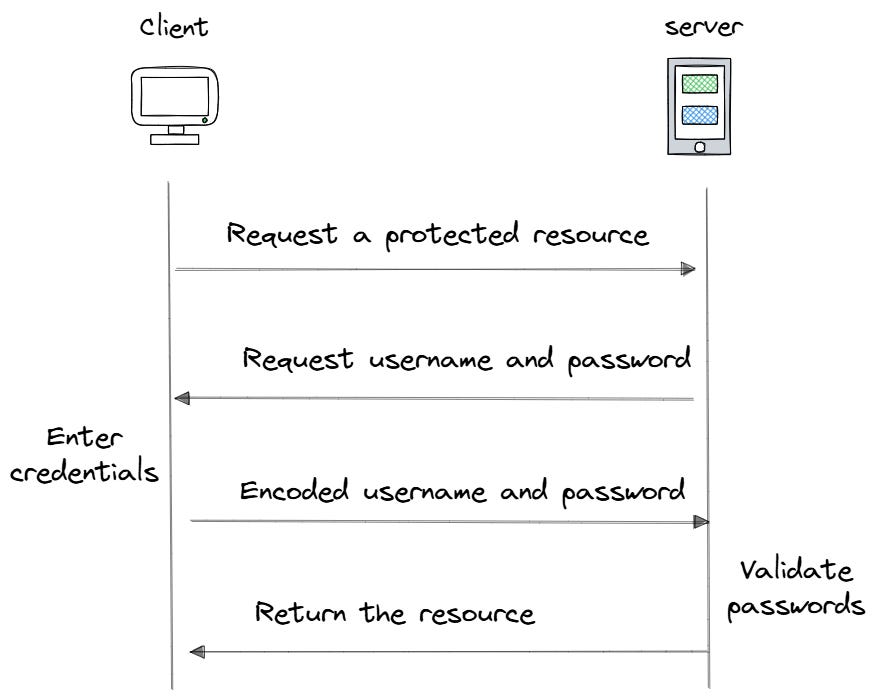
Here is the key problem: Base64 encoding is not encryption. Anyone who intercepts the request can easily decode the credentials. It is like sharing your password in plain text with only a little cover.
Modern applications solve this by using HTTPS, which encrypts all data between the browser and server. But even with this approach, HTTP Basic Access Authentication still has limitations. The browser sends credentials with every request to protected resources within the same domain. This makes things easier for users, but it means that passwords are always being sent across the network.
This method of authentication isn’t beneficial for current websites. However, it is helpful to understand because it shows the main problem: how do we make sure people are who they say they are without sending passwords across the network all the time?
Session-Cookie Authentication
Session-cookie authentication has been introduced with the goal of minimizing the number of password transmissions across the network.
The core idea is simple: users enter their password once during login. The server then issues a session ID that represents their authenticated state. This session ID travels with subsequent requests instead of the password. Think of it like a hotel key card. You show your ID at check-in (authentication), and they give you a key card (session ID). You don’t need to show your ID every time you enter your room; you use the key card.
But what is the role of Cookies? When we discussed how to build stateless services, we saw that cookies are small pieces of data that web servers store in your browser.
When a server sends a cookie to your browser, the browser automatically includes it in every subsequent request to that domain. This allows the server to maintain state across multiple requests.
Cookies serve many purposes: tracking logged-in users, storing preferences, and recording user behavior. For authentication, cookies typically store session identifiers.
Here is the complete flow:
User Login. You submit your username and password to the server. The server validates these credentials against its user database. If they match, the server creates a session for you.
Session Creation. The server generates a unique session ID that serves as the key to your authenticated state. The server stores session data on the server side. This might include your user ID, roles, preferences, and when the session was created.
Session ID Delivery. The server sends the session ID to your browser in a Set-Cookie header. Your browser stores this cookie automatically.